BING/ MICROSOFT MERCHANT CENTER (MMC) SETUP
Get your products showing in Bing
Shopping results.
Bing search shows up in buying paths on Windows devices, Edge, and workplace computers. Bing audience skews older (35–55+), more affluent, and predominantly desktop-based; transactional queries often look different than mobile-heavy shopping on Google. Merchant Center is the connection layer that enables Bing to display your catalog as product listings.
No commitment. Tell us what’s not ranking and we’ll fix it properly.
✓ Account + store setup ✓ Feed connection + scheduling
✓ Optional monthly monitoring
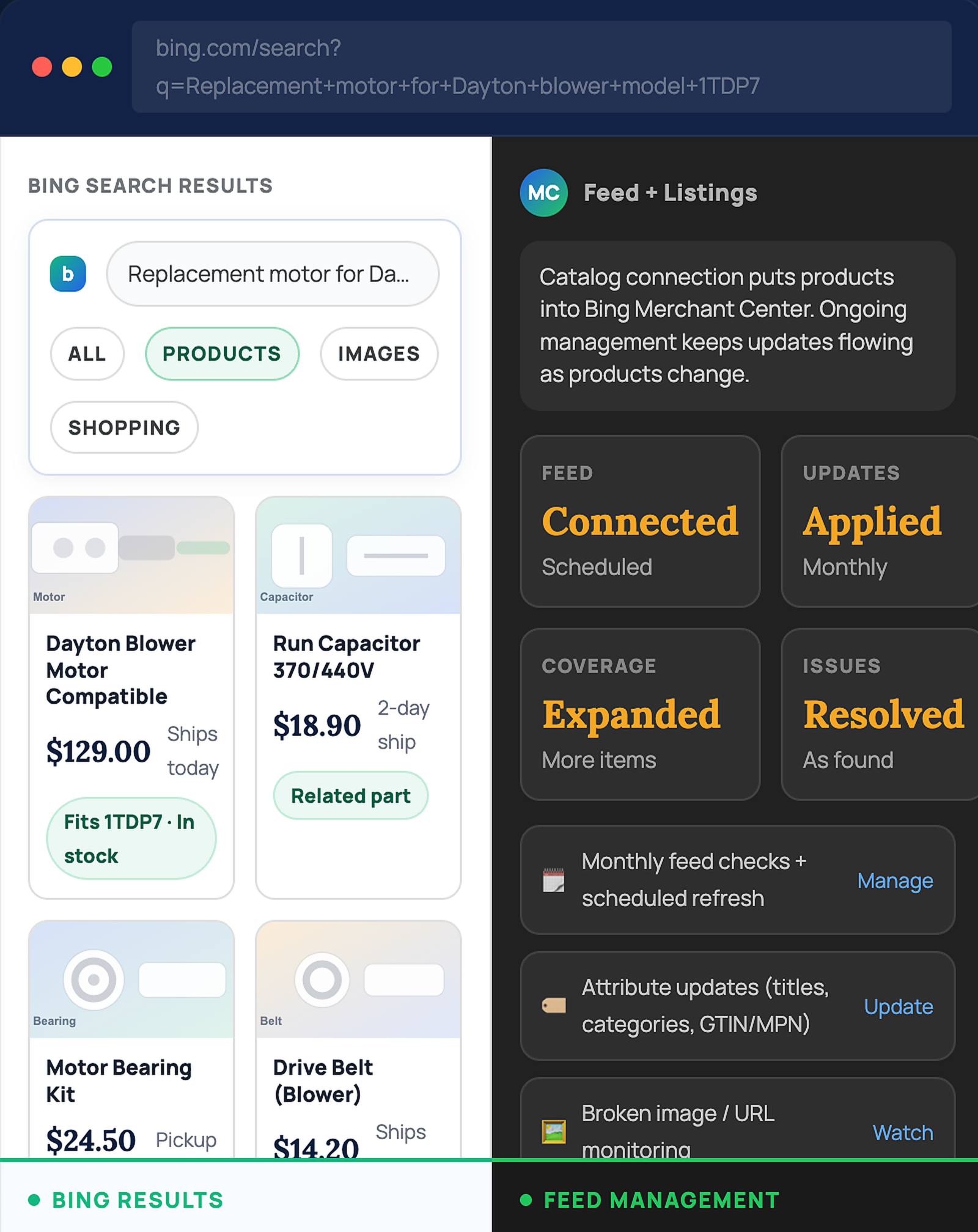
WHY BING MERCHANT CENTER
Bing has purchase intent that goes unseen when catalogs stay disconnected.
Windows and desktop usage keeps Bing present in day-to-day search, especially in workplaces. Categories like MRO supplies, auto parts, industrial products, and mixed B2B/B2C catalogs often depend on desktop research, spec checks, and part-number searches. Merchant Center enables your catalog to appear in Bing product listings and Shopping placements.
Workplace search
Purchasing teams often search from office computers where Bing is the default.
Product-rich results
Bing can show product listings directly in results. Merchant Center is required for catalog-based visibility.
Part-number queries
Replacement motors, bearings, belts, and fitment-based queries benefit from product grids with prices and merchants.
Competitor gap
Plenty of ecommerce catalogs never connect to Bing Merchant Center, especially outside mainstream retail.
Higher-value orders
Industrial and MRO purchases can involve bulk or repeat SKUs, where visibility on Bing supports repeat buying.
Foundation for Shopping ads
Shopping campaigns in Microsoft Ads rely on Merchant Center data. Setup removes a major barrier to launching.
WHAT WE DO
New setup for ecommerce stores that haven’t connected products to Bing.
Service targets stores that are not yet using Bing/Microsoft Merchant Center. Setup creates and configures the account, connects your store and product feed, and sets scheduling so catalog updates sync. Monthly management stays available if you want feed monitoring and updates handled consistently.
One‑Time Setup
Account + feed foundation for Bing product listings.
- Create/configure Microsoft Merchant Center
- Connect store and verify as required
- Connect product feed source (URL/file/app)
- Configure update schedule
- Confirm feed processing and catalog visibility inside Merchant Center
Monthly Feed Management
Ongoing checks and updates for changing catalogs.
- Monthly feed review and refresh
- Feed updates and mapping adjustments
- Broken image/link monitoring
- Attribute updates when needed
- Monthly summary with actions taken
Outcome: catalog connected to Bing Merchant Center, product listings eligible to show in Bing results, and an option to keep the feed managed monthly.
INCLUDE IN SETUP
Everything required to connect your catalog to Bing Merchant Center.
Setup focuses on account configuration, feed connection, and scheduling. Missing product data (GTIN/MPN, categories, images) gets flagged with a clear list of fields to add in your store.
Account configuration
Create/configure Bing/Microsoft Merchant Center and store settings required for listings.
Images & URL review
Confirm product links and images resolve so items can display in Bing results.
Feed connection
Connect feed source and set scheduling so updates run automatically.
Shipping/tax settings
Configure store rules so listing data remains consistent.
Feed requirements check
Validate key attributes used for processing (titles, prices, availability, identifiers).
Setup notes
Summary of feed source, scheduling, and next actions if product data updates are needed.
PRICING
One-time setup, with optional monthly feed management.
Setup connects your catalog to Bing Merchant Center. Monthly management stays optional for monitoring and feed updates.
BING/MICROSOFT MERCHANT CENTER (MMC)
Pricing
Setup starts the connection. Monthly management keeps feed updates handled as products change.
One-Time Setup
Account setup, store connection, feed connection, and scheduling.
- Merchant Center setup + store connection
- Feed source connected + scheduled
- Shipping/tax settings configured
- Feed requirements check
- Setup notes + next actions
Monthly Monitoring & Feed Updates
Ongoing checks and updates so the feed stays current.
- Monthly feed review
- Feed updates and mapping adjustments
- Broken image/link monitoring
- Monthly summary of actions
✓ Setup ✓ Optional monthly support ✓ Clear scope
Note: Product data changes inside your store may be required (for example, GTIN/MPN). Missing fields get listed clearly so your team knows what to update.
FAQ
Questions ecommerce teams ask before connecting to Bing.
Short answers, so you know what’s needed and what you get.
Does Merchant Center matter without Microsoft Ads campaigns?
Yes. Merchant Center connects your catalog to Bing shopping surfaces. Campaign work can happen later.
Categories that tend to perform well?
MRO supplies, auto parts, industrial catalogs, and mixed B2B/B2C ecommerce often see desktop and workplace search intent on Bing.
What does monthly management cover?
Feed monitoring, updates, mapping adjustments, and checks for broken images/URLs. Monthly summary included.
Access required?
Microsoft Ads access (or an invite), store URL, and feed source details (app/URL/file). Store platform feed tools work fine.
Missing GTIN/MPN in the catalog?
Missing identifiers get flagged with a list of fields and impacted items. Updates typically happen inside your store’s product data.
Guaranteed sales?
No. Demand, pricing, competition, and product data quality influence results. Setup ensures catalog connection and eligibility for Bing product listings.
Capture Bing shopping intent.
Bing shopping surfaces depend on Merchant Center. Setup connects your catalog; monthly management keeps feed updates handled as products change. Categories like MRO supplies, industrial, and auto parts often see strong desktop intent on Bing.